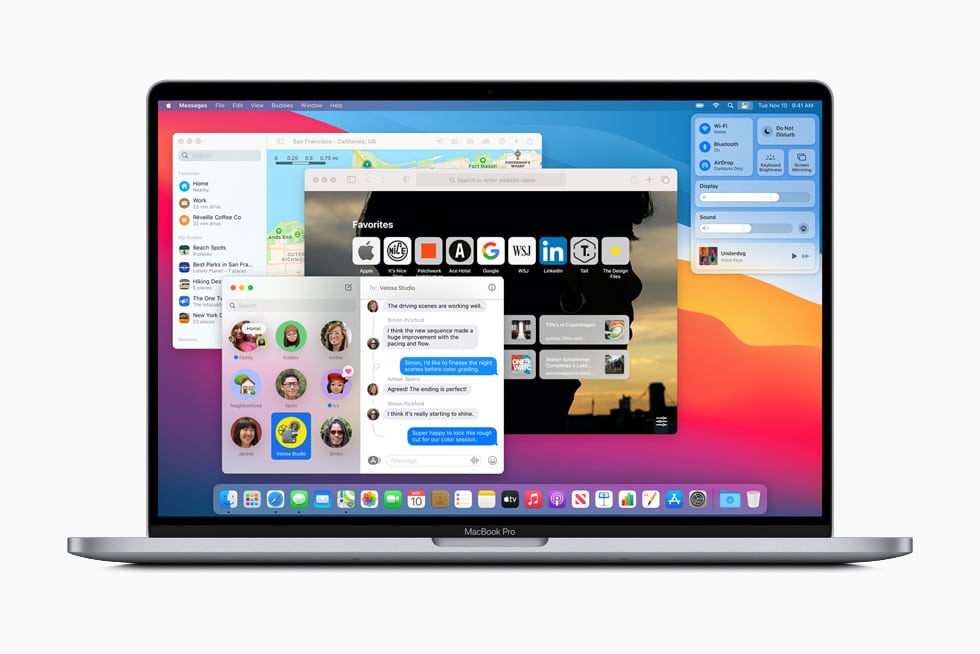
MacOS VPS Hosting Server
VPS Hosting with MAC OS Desktop GUI
- Pre-installed Mac
- Lightning-Fast Performance
- Use directly from your browser via VNC access


Choose the best plan
Honest and affordable pricing model to help you get started easily.
Linux
Windows
- 1 Core vCPU
- 2 GB RAM
- 50 GB NVMe Storage
- 1 TB Traffic
- 1 IPv4 Addresses
- 1 Gbit/s Port Speed
- 2 Core vCPU
- 4 GB RAM
- 50 GB NVMe Storage
- 1 TB Traffic
- 1 IPv4 Addresses
- 1 Gbit/s Port Speed
- 4 Core CPU
- 8 GB RAM
- 50 GB NVMe Storage
- 2 TB Traffic
- 1 IPv4 Addresses
- 1 Gbit/s Port Speed
- 8 Core CPU
- 16 GB RAM
- 50 GB NVMe Storage
- 2 TB Traffic
- 1 IPv4 Addresses
- 1 Gbit/s Port Speed
- 16 Core CPU
- 32 GB RAM
- 50 GB NVMe Storage
- 2 TB Traffic
- 1 IPv4 Addresses
- 1 Gbit/s Port Speed
- 2 Core CPU (Premium)
- 4 GB RAM
- 40 GB NVMe SSD
- 20 TB Traffic
- 1 IPv4 Addresses
- DDoS Attack Protection
- Fast Support
- 4 Core CPU (Premium)
- 8 GB RAM
- 80 GB NVMe SSD
- 20 TB Traffic
- 1 IPv4 Addresses
- DDoS Attack Protection
- Fast Support
- 8 Core CPU (Premium)
- 16 GB RAM
- 160 GB NVMe SSD
- 20 TB Traffic
- 1 IPv4 Addresses
- DDoS Attack Protection
- Fast Support
- 16 Core CPU (Premium)
- 32 GB RAM
- 320 GB NVMe SSD
- 20 TB Traffic
- 1 IPv4 Addresses
- DDoS Attack Protection
- Fast Support
Need More Powerful Server?
Can't find the perfect plan? We'll create a customized server configuration tailored to your specific needs and requirements.
Multiple Operating Systems & Control Panel
Our Datacenter Locations
High-performance servers across the globe
MacOS VPS Hosting with Everything Ready
Powerful VPS servers with macOS already installed and configured. Perfect for iOS app development, Xcode builds, Mac software testing, and Apple ecosystem projects. Start using macOS in the cloud within minutes.
Latest macOS Pre-installed
Your VPS comes with the latest macOS version already installed and fully configured. Access genuine Mac environment instantly without purchasing expensive Mac hardware or dealing with complex installation procedures.
Xcode Development Ready
Xcode IDE pre-installed with complete iOS development tools including Swift compiler, Interface Builder, Simulator, and all necessary SDKs. Start building iOS and Mac apps immediately without lengthy setup time.
Full VNC Remote Access
Complete graphical remote access to your Mac desktop using VNC protocol. Control macOS interface just like sitting in front of a physical Mac. Access from Windows, Linux, or any device worldwide.
High-Performance Hardware
Enterprise Intel Xeon processors with dedicated CPU cores, fast NVMe SSD storage for quick Xcode builds, high RAM for running multiple Simulators, and optimized hardware specifically for macOS virtualization performance.
iOS Simulator Included
Test iOS apps on multiple iPhone and iPad simulators without physical devices. Run simultaneous simulators for different iOS versions and screen sizes. Perfect for app testing and quality assurance workflows.
CI/CD Pipeline Ready
Integrate with Jenkins, GitLab CI, GitHub Actions, or Fastlane for automated iOS builds. Set up continuous integration pipelines for App Store deployment. Perfect for development teams and automation workflows.
Secure Mac Environment
Isolated macOS environment with enterprise security. Encrypted connections, firewall configured, automatic security updates, and secure source code storage. Your intellectual property stays protected at all times.
Snapshot Backups Included
Create instant snapshots of your entire Mac setup including Xcode projects, dependencies, and configurations. Restore previous states in seconds if something goes wrong during development or testing.
Full Administrator Access
Complete admin control over your macOS system. Install any Mac software, configure system preferences, manage user accounts, and customize your development environment exactly how you need it.
Benefits of Cloud-Based macOS Hosting
Access powerful Mac environment without buying expensive hardware. Perfect for iOS developers, app testing, and Mac software development
Complete macOS Freedom
Unlike buying physical Mac hardware costing $1000-$5000, rent powerful Mac server for fraction of the price. Scale resources up or down based on project needs without capital investment.
- No Hardware Investment Required: Avoid buying expensive MacBook Pro, iMac, or Mac Mini. Start with affordable monthly VPS pricing and cancel anytime without hardware depreciation losses.
- iOS App Development Without Mac: Build iPhone and iPad apps from Windows PC or Linux computer. Access complete Mac development environment through remote connection from any device.
- Instant Xcode Environment: Xcode IDE pre-installed with latest iOS SDKs, Swift compiler, simulators, and development tools. Start coding iOS apps within minutes of ordering.
- Test on Multiple iOS Versions: Run simulators for iPhone SE, iPhone 14, iPhone 15, iPad Pro simultaneously. Test app compatibility across different screen sizes and iOS versions easily.
- Faster Build Times with Power: High-performance CPU and NVMe SSD dramatically reduce Xcode compilation times. Build large iOS projects 3-5x faster than entry-level MacBook Air.
- Remote Team Collaboration: Multiple developers access same Mac server worldwide. Share development environment, configurations, and dependencies seamlessly across distributed teams.
- 24/7 Build Server Availability: Run automated builds, tests, and App Store uploads round the clock. Your Mac server never sleeps, ensuring continuous integration pipelines work flawlessly.
What You Can Build with MacOS VPS Hosting
From iOS apps to Mac software, macOS VPS handles any Apple development workflow
iOS App Development
Build iPhone and iPad applications using Xcode and Swift. Develop iOS apps from Windows or Linux computers. Perfect for mobile developers without Mac hardware.
Mac Game Development
Create macOS games using Unity, Unreal Engine, or native Metal graphics. Test performance on powerful Mac hardware. Build games without owning expensive MacBook Pro.
CI/CD Build Automation
Automate iOS app builds with Jenkins, GitLab CI, or GitHub Actions. Deploy to TestFlight and App Store automatically. Essential for development teams and agencies.
iOS App Testing & QA
Test apps on multiple iOS versions and devices using simulators. Run automated UI tests with XCTest. Quality assurance teams without physical iPhone devices.
Mac Software Development
Build native macOS applications using SwiftUI, AppKit, or Electron. Develop desktop software for Mac App Store. Cross-platform development from any operating system.
iOS Development Learning
Learn iOS development without buying expensive Mac. Students and beginners access Xcode environment affordably. Practice Swift programming and UIKit frameworks.
Design & Creative Work
Run Mac-exclusive design tools like Sketch, Figma desktop, or Final Cut Pro. Access creative software without Mac ownership. Designers working from Windows computers.
Cross-Platform Testing
Test website and software compatibility on macOS Safari browser. Verify application behavior on Mac environment. Essential for cross-platform development teams.
Enterprise-Grade macOS Infrastructure
Optimized servers specifically configured for macOS virtualization and iOS development
NVMe SSD Speed
Fast Xcode builds
macOS Version
Always up-to-date
Setup Time
From order to coding
Uptime SLA
Reliable builds 24/7
MacOS VPS vs Buying Mac vs Mac Cloud Services
Understanding the differences helps you choose the right macOS solution
| Feature Comparison | Physical Mac | MacOS VPS Hosting | Mac Cloud Services |
|---|---|---|---|
| Initial Cost | $1000 - $5000 | $29.90 - $149.90/month | $50 - $200+/month |
| Setup Time | Hours to days | ✓ 5 minutes | 10-30 minutes |
| Xcode Pre-installed | ✗ Manual install | ✓ Ready to use | ✗ Manual install |
| Remote Access | Need configuration | VNC included | Web-based only |
| Scalability | ✗ Buy new Mac | ✓ Instant upgrade | Limited options |
| 24/7 Availability | Power costs | Included | Included |
| Backup & Snapshots | Manual Time Machine | ✓ Automatic | Limited |
| Hardware Maintenance | Your responsibility | We handle everything | Provider handles |
| Best For | Heavy daily use | Development & CI/CD | Occasional testing |
| Team Access | ✗ One person | ✓ Multiple users | Limited users |
MacOS VPS Hosting Questions Answered
Everything you need to know about cloud-based macOS servers for development
Start Building iOS Apps Today
Get your macOS VPS with Xcode pre-installed and configured. Build iPhone apps from any computer without buying expensive Mac hardware.